

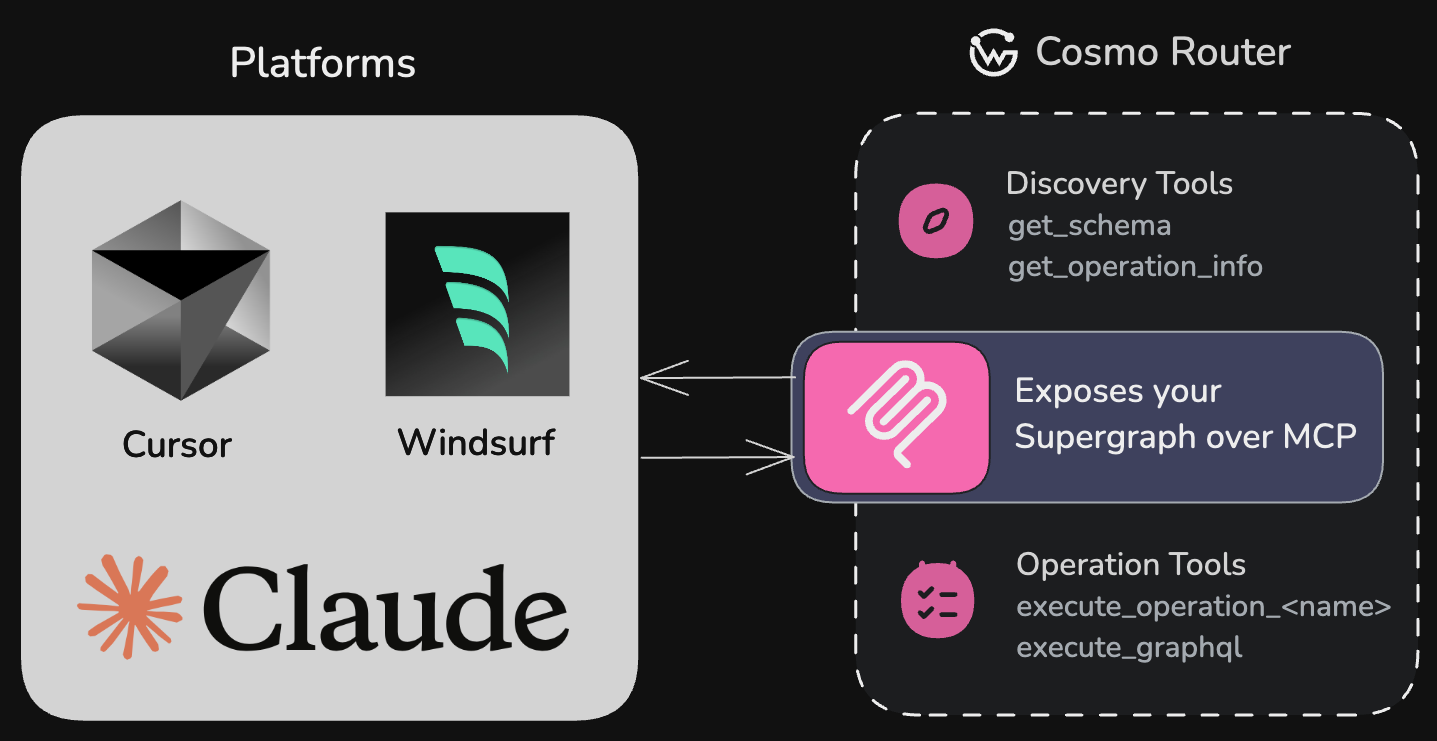
Cosmo Router exposes your GraphQL Supergraph over MCP, enabling AI platforms like Cursor, Windsurf, and Claude to discover and execute operations.
We support only the latest MCP specification
2025-06-18 with Streamable HTTP
support.What is MCP?
MCP (Model Context Protocol) is a protocol designed to help AI models interact with your APIs by providing context, schema information, and a standardized interface. The Cosmo Router implements an MCP server that exposes your GraphQL operations as tools that AI models can use.MCP enables AI models to understand and interact with your GraphQL API without
requiring custom integration code for each model.
Capabilities
API Discovery
Make your GraphQL API automatically discoverable by AI models like OpenAI,
Claude, and Cursor
Rich Metadata
Provide detailed schema information and input requirements for each
operation
Secure Access
Enable controlled, precise access to your data with operation-level
granularity and OAuth 2.1 authorization
AI Empowerment
Empower AI assistants to work with your application’s data through a
standardized interface
Get Started
Quickstart
Get MCP running in 5 minutes with a minimal configuration and your first
operation.
IDE Setup
Connect Claude, Cursor, Windsurf, VS Code, and other AI tools to your MCP
server.
Operations
Learn how to create, describe, and organize GraphQL operations for AI
consumption.
Configuration
Full reference for all MCP configuration options, sessions, and storage
providers.
OAuth 2.1
Secure your MCP server with JWT-based authentication and multi-level scope
enforcement.
CLI MCP Server
Use the Cosmo MCP Server in your IDE for schema exploration, dream queries,
and more.
Why GraphQL with MCP?
The integration of GraphQL with MCP creates a uniquely powerful system for AI-API interactions:- Precise data selection — GraphQL’s nature allows you to define exactly what data AI models can access, from simple queries to complex operations across your entire graph.
- Declarative operation definition — Create purpose-built
.graphqlfiles with operations tailored specifically for AI consumption. These function as persisted operations (trusted documents), giving you complete control over what queries AI models can execute. - Self-documenting operations — Using the September 2025 GraphQL spec, you can embed rich descriptions directly in your operation definitions, making them immediately understandable to AI models without external documentation.
- Flexible data exposure — Control exactly which operations and fields are exposed to AI systems with granular precision.
- Compositional API design — Build different operation sets for different AI use cases without changing your underlying API.
- Runtime safety — GraphQL’s strong typing ensures AI models can only request valid data patterns that match your schema.
- Built-in validation — Operation validation prevents malformed queries from ever reaching your backend systems.
- Evolve without breaking — Change your underlying data model while maintaining stable AI-facing operations.
- Federation-ready — Works seamlessly with federated GraphQL schemas, giving AI access to data across your entire organization.
Real-World Example: AI Integration in Finance
A large financial services company needed to integrate AI assistants into their support workflow — but faced a critical problem: how to allow access to transaction data without exposing sensitive financial details or breaching compliance.Without proper data boundaries, AI models might inadvertently access or expose
sensitive customer information, creating security and compliance risks.
- Security vulnerabilities: Their existing REST endpoints contained mixed sensitive and non-sensitive data, making them unusable for AI integration without major restructuring.
- Development bottlenecks: Their engineering team estimated 6+ months to create and maintain a parallel “AI-safe” REST API, delaying their AI initiative significantly.
- Data governance issues: Without granular control, they couldn’t meet regulatory requirements for tracking and limiting what data AI systems could access.
Using GraphQL and MCP to Define a Safe Access Layer
The team adopted GraphQL with MCP to expose only specific operations tailored for AI access. By using operation descriptions (following the September 2025 GraphQL spec), they could provide clear context to AI models about what each operation does and its limitations:- What data the operation provides
- What sensitive information is excluded
- When to use this operation appropriately
- Accelerate compliance review by clearly documenting what data AI could access in the operation definitions themselves
- Avoid duplicating APIs, using GraphQL’s type system and persisted operations
- Enforce operational boundaries through schema validation and mutation exclusion
- Provide self-documenting operations that AI models could understand without external documentation
- Scale safely by exposing new fields to AI only when explicitly approved
Outcome
This approach helped the company:- Achieve compliance sign-off in weeks instead of months
- Reduce security review effort by 95%
- Maintain a single source of truth for internal and AI clients
- Future-proof their integration as the API evolved
How It Works
The Cosmo Router MCP server:- Loads GraphQL operations from a specified directory
- Validates them against your schema
- Generates JSON schemas for operation variables
- Exposes these operations as tools that AI models can discover and use
- Handles execution of operations when called by AI models
- It discovers available GraphQL operations as tools and their descriptions
- Reads the tool descriptions to understand what each operation does, what data it returns, and when to use it
- Understands input requirements through the JSON schema
- Executes tools with appropriate parameters
- Receives structured data that it can interpret and use in its responses
Built-in MCP Tools
The MCP server provides several tools out of the box to help AI models discover and interact with your GraphQL API:Discovery Tools
get_operation_info
Retrieves detailed information about a specific GraphQL operation, including
its input schema, query structure, and execution guidance. AI models use
this to understand how to properly call an operation in real-world
scenarios.
get_schema
Provides the full GraphQL schema as a string. This helps AI models
understand the entire API structure. This tool is only available if
expose_schema is enabled.Execution Tools
execute_graphql
Executes arbitrary GraphQL queries or mutations against your API. This tool is only available if
enable_arbitrary_operations is enabled, allowing AI models to craft and execute custom operations beyond predefined ones.execute_operation_*
For each GraphQL operation in your operations directory, the MCP server automatically generates a corresponding execution tool with the pattern
execute_operation_<operation_name> (e.g., execute_operation_get_users).Next: Quickstart
Ready to get started? Follow the quickstart guide to have MCP running in 5 minutes.